Guide 05 Phones
Phone camera tips for environmental and street portraits
Which lens to use, when Portrait mode helps, and how to stop the phone from flattening every face.
A phone is a fine camera for environmental and street portraits. It's small, people find it less intimidating than a big camera, and the main sensor in a recent phone is good enough for anything you'll post on X. Phones do have habits that work against portraits, though. These tips are about steering around them.
Pick the right lens
Most phones now have two or three cameras, labelled something like 0.5x, 1x and 2x, 3x or 5x. They behave very differently with faces.
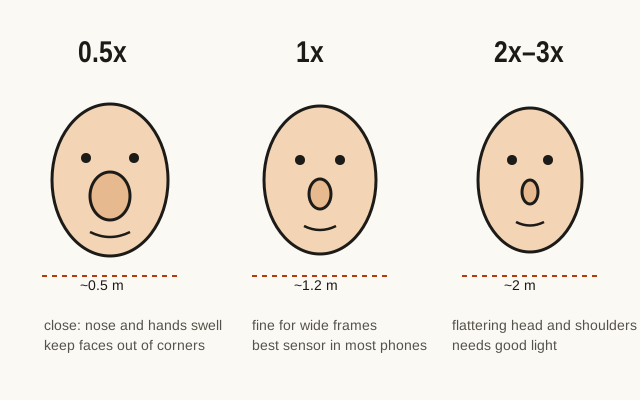
The 1x main camera has the biggest sensor and usually the brightest lens, so it gives the cleanest pictures, especially in dim light. Use it for the wide environmental frame and for anything indoors.
The 2x, 3x or 5x camera makes you stand further back for the same framing, and that distance flatters faces: noses get smaller, ears come back into view. Use it for medium and head-and-shoulders frames when there's plenty of light. In low light, some phones quietly crop from the main camera instead of using the telephoto, and the quality drops. If the picture looks mushy, go back to 1x and step closer.
The 0.5x ultra-wide is the troublemaker. Close up, it stretches anything near the edges, so a hand reaching toward the camera turns into a baseball mitt. It can make a dramatic wide frame of a big space, but keep the person in the middle and well back.
Focus and exposure
Phones expose for the whole scene and often brighten faces so they look like a passport photo. Take control with two taps.
Tap the person's face to set focus there. Many phones then let you slide a small sun icon up or down; drag it down a little so the highlights on skin don't burn out. On iPhone, a long press locks focus and exposure (AE/AF Lock) so they don't jump when the person moves. On most Android phones, the camera app has a similar lock, often with a long press.
Wipe the lens. It's the most common reason phone portraits look soft, because a phone lives in pockets and hands.
Portrait mode, carefully
Portrait mode fakes a shallow depth of field by guessing which parts of the picture are near and which are far, then blurring the far parts. For a medium frame against a plain wall, it can look good. For environmental portraits it often works against you, because the place is supposed to stay visible.
If you use it, check three spots at full size: the edges of the hair, glasses, and hands. That's where the software guesses wrong and leaves halos or blurs a finger into the background. Many phones let you lower the blur strength after the fact. Set it lower than the default; heavy blur is the giveaway of a phone portrait.
Night mode
In dim light, night mode combines many frames over a second or more. It can make a street portrait at night look clean and bright, but your subject has to keep still. Ask them to hold the pose for a count of three, brace your elbows against your body or the phone against a wall, and take several. Expect a few of them to show motion in hands or hair.
Night mode also brightens everything, so a night scene can end up looking like dusk. Drag the exposure down a little if you want it to feel like night.
RAW and editing headroom
Many recent phones can shoot RAW (Apple ProRAW, Samsung Expert RAW, and RAW options in Pixel and other Android camera apps). RAW files keep more detail in highlights and shadows and skip the phone's heavy sharpening, which helps if you plan to edit seriously. They are much larger, though, and need editing before they look good. For quick shares, the standard photo is fine.
Whatever you shoot, turn off any beauty or face-smoothing filter. They erase skin texture and make people look waxy, and most subjects don't like the result once they notice.
Composition on a small screen
Turn on the grid in the camera settings. It helps you keep vertical lines straight, which matters indoors where door frames and shelves lean if the phone is tilted. Hold the phone at about chest height and level, not angled down from your eye. Tilting down makes walls converge and shrinks the person's legs.
For X, a vertical frame fills more of a phone screen in the timeline. Shoot both vertical and horizontal versions of your key frames, because a horizontal often works better for a wide scene and you won't know which crop suits the post until later.
Location data
Your phone almost certainly writes GPS coordinates into every photo. For street portraits that's usually harmless. For portraits made in someone's home or workplace, remove it before sharing. On iPhone, the share sheet has an Options button at the top where you can switch off Location for that share. On Android, Google Photos lets you edit or remove a photo's location from its details view (the exact menus vary by version), and most camera apps have a setting to stop saving location at all. The sharing guide has more on this.
Being less of a phone
People pose for a phone the way they pose for selfies. Hold the phone steady, take your time, and talk with them like you would with a camera. It's a small thing, but slowing down tells them you're making a portrait, not a quick snap.
Questions
Should I use Portrait mode for environmental portraits?
Usually not for the wide frame, because the setting is supposed to stay readable. Portrait mode can work for a medium frame against a clean background, but check the edges of hair, glasses and hands, where the software blur often goes wrong.
Which phone lens is best for portraits?
The 1x main camera for wide and environmental frames, since it usually has the largest sensor. The 2x or 3x telephoto for head-and-shoulders portraits in good light. Avoid the 0.5x ultra-wide for faces unless the person is far from the edges of the frame.