Guide 07 Sharing
Sharing portraits on X: crops, alt text, credit and privacy
Aspect ratios, alt text, tagging and credit, and how to strip location data before you post.
Posting a portrait is the last step of the shoot, and it's the one with the most consequences for the person in it. A street portrait can be reshared thousands of times, saved, cropped and searched. This guide covers the practical parts of posting on X: crops, alt text, captions and credit, and the privacy checks that protect your subject. Tweeter Street is an independent site and not affiliated with X Corp. Features on X change, so check the composer when something here doesn't match.
Crops and aspect ratios
You can attach up to four images to a post on X. How they appear in the timeline depends on the number of images and on the app, and X has changed its preview cropping several times over the years. Some safe habits survive every change:
- A vertical 4:5 or 3:4 frame takes up more of a phone screen than a horizontal one, which suits medium portraits.
- A 16:9 horizontal works well for wide environmental frames.
- In multi-image posts, previews are cropped to fit a grid, so keep faces near the center of each frame. A square 1:1 crop is the most predictable.
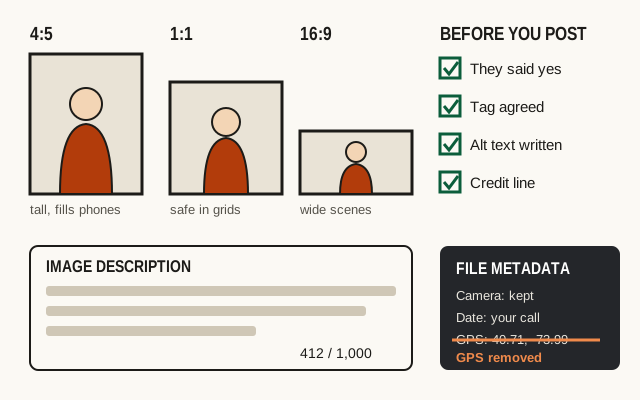
After you attach an image, check the preview in the composer. If a crop cuts through the face, re-crop it yourself before posting rather than leaving it to the app.
Alt text
Alt text (X calls it an image description) is read aloud by screen readers and shown to anyone who taps the ALT badge. X allows up to 1,000 characters per image, which is far more than most portraits need. You add it by tapping "Add description" or the ALT button on an attached image. If you post four images, each one gets its own description.
Good portrait alt text describes what a sighted viewer would notice first, in that order:
- The type of frame: wide, close-up, detail.
- The person, in terms they would accept: approximate age, clothing, expression, what they're doing.
- The setting and the light, in a few words.
- Anything in the frame that carries the story, like a tool, a sign or a pet.
An example: "Medium portrait of a bike mechanic in his fifties wearing a grease-stained apron, laughing, as he spins a wheel on a repair stand. Window light from the left; behind him, rows of inner tubes hang from hooks."
That's about 200 characters. Leave out guesses about someone's ethnicity, health, gender identity or job when they didn't tell you. If the caption already names the person, the alt text doesn't need to repeat the name. Don't start with "Image of," since screen readers already announce an image.
Captions and credit
The caption is where you give context the picture can't. Keep it short: who (if they agreed to be named), roughly where, and one line about them, ideally in their own words. Posts on X are limited to 280 characters for most accounts, counted in a particular way: any link counts as 23 characters regardless of length, and each emoji counts as two. The planner on our home page counts this way, but X's own composer has the final word.
For credit, add your handle or name in the caption or as a small, unobtrusive mark on the image if you want one. If someone else shot the portrait and you're sharing it, credit them by handle and ask first. Reposting another photographer's portrait without permission is both rude and, in most cases, copyright infringement.
Tag the subject only if they asked to be tagged. Tagging sends them a notification and links the picture to their profile, where their followers and anyone searching their name will find it. Some people love that. Others agreed to a portrait, not to having it attached to their account.
Location metadata
Most phones and many cameras store GPS coordinates in each photo's EXIF data. For a portrait made in someone's home, that means the file can contain their home address to within a few meters.
Independent tests show X strips this location data from images uploaded through its own apps and website. Don't rely on it. Scheduling tools, cross-posting apps, cloud links and messaging apps handle metadata in different ways, and the same file often ends up in more than one place. Remove the location from the file before it leaves your device:
- iPhone: in the share sheet, tap Options at the top and turn off Location before sharing or saving to Files.
- Android: turn off location tags in the camera app, or remove the location in Google Photos before sharing (menu names vary by phone).
- Lightroom Classic: in the export dialog, under Metadata, choose to remove location info.
- Windows: right-click the file, choose Properties, then Details, then "Remove Properties and Personal Information".
- macOS Preview: open the Inspector, choose the GPS tab if there is one, and click Remove Location Info.
What the picture itself reveals
Stripping metadata does nothing about what is visible in the frame. Before posting, look at the picture as a stranger would and check for:
- house numbers, street signs or a distinctive view from a window that pins down a home
- mail, packages and documents with names or addresses
- computer screens, staff rotas, ID badges and whiteboards
- car license plates parked outside a home
- children, or other people who did not agree to be photographed
Blur or crop what you need to. For a portrait at someone's home, a caption like "in her kitchen in Pittsburgh" is plenty; the street name isn't needed.
After you post
Send your subject the link, or the image itself if they're not on X. If they ask you to take it down, delete it promptly and without argument, whatever the law says. Turn off replies or limit them if a post starts attracting unkind comments about the person. They trusted you with their picture, and your responsibility doesn't end when you hit post.
Questions
What is the alt text limit on X?
X allows up to 1,000 characters of image description per image, and you can add a description to each image in a post. A good portrait description is usually one to three sentences.
Does X keep the GPS location in my photos?
Independent tests show that X removes location metadata from images uploaded through its own apps and website. Scheduling tools and other services may not, and the same file may be shared elsewhere, so remove GPS data from the file yourself before posting a portrait made at a home or workplace.
Should I tag the person in the photo?
Only if they said yes. Some people are happy to be tagged by handle, some want their first name in the caption, and many would rather not be identified. Ask during the shoot and write it down.